Thursday, December 16, 2010

What is My IP

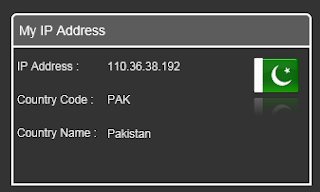
I have created a simple application which will tell the user what is IP address of the user and also the country name and country is also displayed. For this I have used the free web service which you can find here they have other free services as well.
For this application I have used the Image and the TextBlock control in my application and the web service I have used from the here. The code is simple one I have used one class which is used as the view model for the main user control ( with the name MainPageViewModel and which has one property of MyIPAddress of type GeoIP type. which is available when you add the service reference) and the one converter class which is listed in the List 1.The code in the List 1 is simple one here I have passed the country code to the converter and then by concatenating path with the country code and the png extension I return the image path of the country flag. if the country code is empty the default image will be return which you can see in the Image 1.  And if the country code and the other information is successful then you can see the output as shown in the Image 2.

public object Convert(object value, Type targetType, object parameter, System.Globalization.CultureInfo culture) { string strReturnValue = "Images/Default.png"; string strCountryCode = value as string; if (strCountryCode.Trim() != string.Empty) strReturnValue = "Images/" + strCountryCode.ToUpper() + ".png"; return strReturnValue; }
List 1

Image 1


Image 2

Note: If your country flag is not displayed please let me know with the country code so that I can update it on my example as well. 

I have only uploaded the web side not the Silverlight application.  You can download the source code from here and you can open the What Is MyIPTestPage page in IE or in your web browser to check the application.

All and any comments / bugs / suggestions are welcomed!

Saturday, November 13, 2010

Browser Information In Silverlight

In this post I will show you how to get the browser information.To get the browser information the namespace used for this is System.Windows.Browser. The BrowserInformation object contains properties such as the name, product name, product version , browser version etc. Let us start with the example which will use to get this information and display on the screen which I will share with you at the end of the post I will use two screen shot one for the Internet explorer and the second one for the Fire Fox.
For this Example I have create one class with the name BrowserInfo  which has the properties like BrowserName , BrowerVersion, Platform, ProductName, UserAgent of type string , IsCookiesEnabled of type Boolean to indicate whether Cookies are enabled or not , BrowserMinorVersion and BrowserMajorVersion are of type int.You can see the default constructor of the BrowserInfo class which is used to initialize all the properties of the class.

public BrowserInfo() { BrowserName = HtmlPage.BrowserInformation.Name; BrowserVersion = HtmlPage.BrowserInformation.BrowserVersion.ToString(); BrowserMajorVersion = HtmlPage.BrowserInformation.BrowserVersion.Major; BrowserMinorVersion = HtmlPage.BrowserInformation.BrowserVersion.Minor; IsCookiesEnabled = HtmlPage.BrowserInformation.CookiesEnabled; Platform = HtmlPage.BrowserInformation.Platform; ProductName = HtmlPage.BrowserInformation.ProductName; ProductVersion = HtmlPage.BrowserInformation.ProductVersion; UserAgent = HtmlPage.BrowserInformation.UserAgent; }
List 1

In the code you can see that BrowserName property is assigned the value of the Name in the BrowserInformation object which is the static member of the HtmlPage static class which is reside in the System.Windows.Browser namespace. The Name property of the BrowserInformation return the version of the browser technology that the current browser is based on.The browser technology name is typically different from the browser product name. CookiesEnabled property of BrowserInformation object indicate whether the browser supports cookies or not. The ProductName property of the BrowserInformation object get the product name of the browser.The browser product name is the familiar name of the browser, such as "FireFox".
You can see the output of the two different browser One for the internet explorer and second one is by using the Fire fox you can see the different properties of the two browsers.

Fire Fox
Internet Explorer
You can also see the Major and Minor version of the browser as shown in the screen shots. The UserAgent property will Gets the user agent string of the browser.The Platform property will return name of the operating system that the browser is running on. You can use these properties to developer application like the Google analysis or you can use them to show the trend of your site the user operation system the browser name etc.

All and any comments / bugs / suggestions are welcomed!