I have just started my work in the silverlight 4. Here is the my first post on the silver light 4 control. In this post I have used the data grid control of the silverlight 4, which is one of the my favorite control in every framework. Below is the main screen of the my application here you can see that I have Data grid control at the top , which shows the First name, Last Name, Gender, Date of Birth and the email id. And also I have used the text box , date picker and button control in that form as well.
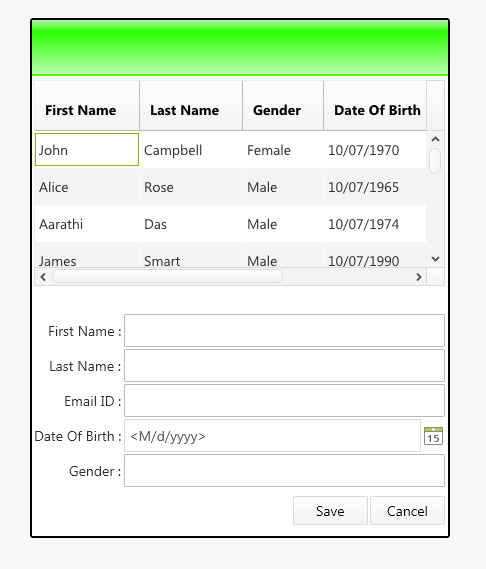 And below is the my screen shot when user click on any of the row in the grid control. I have used the binding. So each of the text box is bind to the corresponding field in the data grid control, First name text box is bind to the First name text box , Last Name is bind to the Last Name text box and so on. And two button controls which are doing nothing, they are just displayed here.
I have divide my application into three parts model, Model view and view (MVVM). I have create folder for model and model view but not for the view as my main form is the only view and I have created one model and model view for the main form. I have also create converter folder which I will explain as below.
1- Model In model I have person class which has the first name, last name, gender , email address and the date of birth. The person class is inherit from the INotifyChangedProperty so that I have raise the property change event and send the latest value to the view, when value of any of the property is changed. As I have bind the first name and the last name to the header , to show the person full name in the header, when the value is changed in the first name and last name text box then it will be send back to view and the latest value are shown in the grid column and also in the header of the form. The remain fields are also updated in the data grid columns.
View Model:
In the view model I have two properties one which return the list of person class and one which hold the current selected record of the data grid control which are PersonCollections and SelectedRecord. The person collection property which hold the all the person list will be bind to the ItemSource of the data grid control and the SelectedRecord property is bind to the SelectedItem property of the data grid control. In the view model I have raise the property change for the SelectedRecord property. And then Properties of the SelectedRecord property is bind to the Individual control like first name, last name, data of birth , gender and the email address.
Converters:
The converter folder contain two converter. One to convert the datetime to only date part to show the date of birth, as If displayed directly the whole date and time is displayed, so in order to show only date the converter is used. Second one is the BooleanToVisibilityConverter class which is used to set the visibility of the textblock which is placed between last name and first name the comma (,) sign, I want to hide the text block if the first name is empty string. If the first name is empty then only the last name is shown but if the first name is not emty then the comma (,) symbol is placed between the last name and the first name.
Hope you get starting point of the data grid in silverlight by separating the view model and view.You can download the source code from here
All and any comments / bugs / suggestions are welcomed!

